A ZINE FOR WOMEN
Drowning in Advice
A physical zine created alongside the research wall, giving emotional context to the research and data.
Featured spreads:


View full zine (10 pages)
Print · 5.5 × 8.5 in · whole punched on binder rings
USER FLOWS
How users move through KAE
IDEATION
Each persona follows a unique journey through KAE based on their goals and needs. We mapped these flows to understand how users navigate education, tracking, and personalized support.
Key insight:
Emily never has to know what to search for. The app explains what's happening in her body first, then lets her go as deep as she wants, building literacy without overwhelm.
Key insight:
Sarah's flow is about patterns, not perfection. The app reflects her data back to her in a way that feels supportive, "On weeks you slept 7+ hours, mood improved" not prescriptive.
Key insight:
Three entry points into Explore means Linda always has a way in, by symptom, by category, or by what KAE surfaces for her. The save feature lets her build her own evidence base over time.
Emily, 22
AI & Home insight flow
E
Emily is still learning about her body. The home screen surfaces a gentle insight, while the AI helps her explore symptoms and ask follow-up questions through judgment-free, evidence-based support.
Opens app
Home + loading screen
"What Might Help You Today"
Home + loading screen
Home insight
"What Might Be Happening"
"Nothing is wrong — your body may just be shifting."
"Want to understand this more?"
Taps to go deeper
Asks AI a question
Source-backed response with things to do
"Want to understand this more?"
Taps to go deeper
Reads answer
Flow Complete
3 paths: ask more · view sources · go deeper in app
Sarah, 35
Tracking flow
S
Sarah opens the app to log her week. The tracker surfaces patterns she's already building: sleep vs mood, cycle timing, and ends with gentle, pressure-free recommendations.
Opens app
Welcome message
Logs today
Mood · Sleep · Symptoms · Water
"You've logged low energy 3x this week"
Home surfaces her patterns
Mood · Sleep · Symptoms · Cycle bar
Scrolls graphs
Sleep vs Mood · Cycle vs Energy · Symptom Frequency
Tracker: weekly view
"What Might Help This Week"
Flow Complete
+1 glass water · earlier bedtime
Linda, 50
Explore flow
L
Linda wants to understand perimenopause on her own terms. She enters through a home prompt, navigates Explore by topic, finds a relevant article, and saves it to her personal knowledge library.
Opens app
"Where you are now"
Taps Nutrition tab
Scrolls curated articles
"What this means" Menopause Insights
Home prompts Explore
3 entries: search · topic tab · curated recs
Finds article
"Why Hot Flashes Happen"
Explore page
Reads summary
Flow Complete
+1 glass water · earlier bedtime
Saves to file
Personal knowledge library
02
Tracking / Reflection
— Calendar with mood icons
Days marked with icons and stickers to reflect how the user felt, making patterns visible over time without data overload
— Cycle countdown
"24 days til" tappable to see predictions and prepare for how the body will likely feel. Hover for AI-powered context
— Sleep tracker
Quick log with a slider, feeds into the sleep vs mood graph to surface correlations the user might not have noticed
— Graphs
Sleep vs mood · Cycle vs energy · Symptom frequency, all shown together so the user can see how everything overlaps
— Reminders
Optional notifications for cycle moments, medication, or rest — personalised and never pushy
Any symptoms:
Sleep tracker:
Reminders:
7 hours
need help falling asleep
Refection
☁️
Important dates:
January
24
days til
🌞
⭐️
🌧
🧠
03
Explore
— Three entry points
Search, genre tabs (hormones, nutrition, mood, movement, life stage), and curated recommendations, so every user has a way in regardless of how they think about their health
— Energy-based framing
"What do you have energy for?" content is framed around capacity, not aspiration. Low-pressure discovery that meets the user where she is today
— Videos, articles, podcast
Mixed media surfaced based on the user's interests and past interactions, all science-backed or clearly marked editorial
— AI element
Quick question input for when the user just wants a simple, sourced answer, without having to browse
— Save to file
Users can bookmark content to a personal library, building their own evidence base over time
Search
Soft Check-In • 4.3K views • 2 weeks ago
Low Battery Podcast • 22K views • 1 month ago
fitness & movement
Fitness & Movement

wellness
Explore
Search
What do you have energy for?
yoga for 30 mins
by: dbsdbd
yoga for 30 mins
by: dbsdbd
yoga for 30 mins
by: dbsdbd
What do you have energy for?
yoga for 30 mins
by: dbsdbd
yoga for 30 mins
by: dbsdbd
yoga for 30 mins
by: dbsdbd
yoga for 30 mins
by: dbsdbd
What do you have energy for?
yoga for 30 mins
by: dbsdbd
yoga for 30 mins
by: dbsdbd
yoga for 30 mins
by: dbsdbd
yoga for 30 mins
by: dbsdbd
yoga for 30 mins
by: dbsdbd
yoga for 30 mins
by: dbsdbd
yoga for 30 mins
by: dbsdbd
yoga for 30 mins
by: dbsdbd
yoga for 30 mins
by: dbsdbd
What do you have energy for?
What do you have energy for?
04
Profile
— Life phase carousel
Horizontal scroll showing life stages — the user's current phase is always largest. Personalized so perimenopause or menopause stays prominent
— Personal insights
Recent moods, patterns, time spent resting, goals hit, framed as reflection, not performance. No scores, no streaks
— Settings categories
Onboarding quiz, preferences, journal, sleep settings, notification preferences, reminders, history, each a category, not a buried menu
— Privacy controls
Data transparency, accessibility options, account & support, surfaced prominently because trust is core to KAE's design principles
Profile
Turn off notifications this week
Personal insights
wellness
Tracking & Reflection Tab
The more Emily tracks, the clearer her patterns become. She can save and share her data with a healthcare provider at any time. The tracker is built around understanding, not optimization.
SCREEN 03


Designed for Real Life
PHOTOS & NOTIFICATIONS
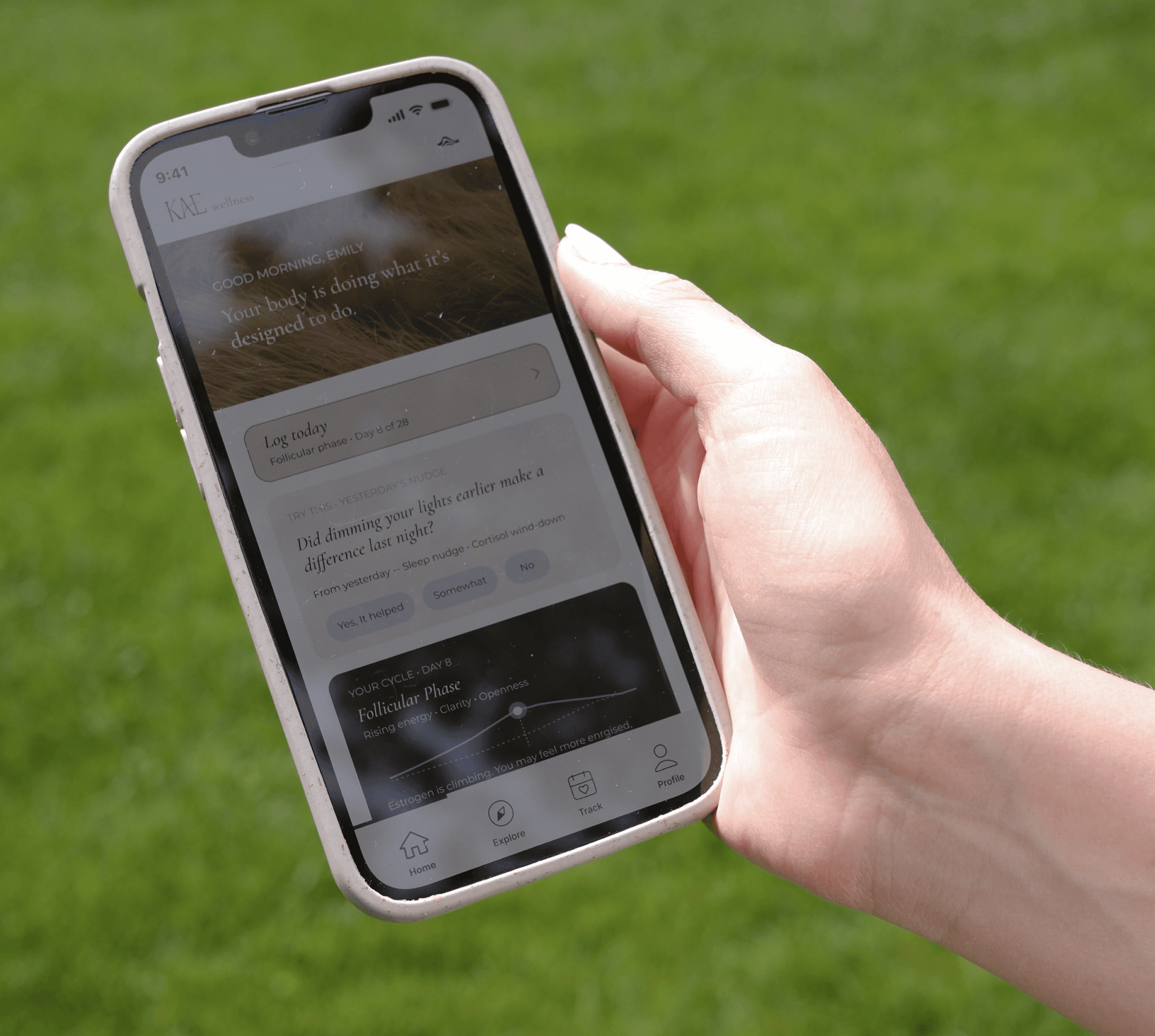
KAE was always meant to live in the margins of real life, not in a dedicated wellness hour that most women don't have. These images show where it actually lives: on the lock screen during a coffee break, on a lunch break, or on an afternoon in the grass.


Explore Tab
The Explore page helps users discover personalized insights, content, and recommendations based on their activity and interests. It serves as a hub for relevant trends and suggestions, encouraging curiosity and helping users uncover new connections.
SCREEN 04
